[CI/CD] CI/CD Pipeline 구축 (7) - GitHub Actions CI/CD 워크플로우
해당 프로젝트의 전체소스는 여기 에서 확인하실 수 있습니다.
1. CI/CD 워크플로우 개요
CI (Continuous Integration)
코드 변경 시 자동으로 빌드 & 테스트를 수행 → 품질 검증CD (Continuous Deployment)
main 브랜치 merge 시 자동으로 Docker 이미지 빌드 & 푸시, EC2 배포까지 수행
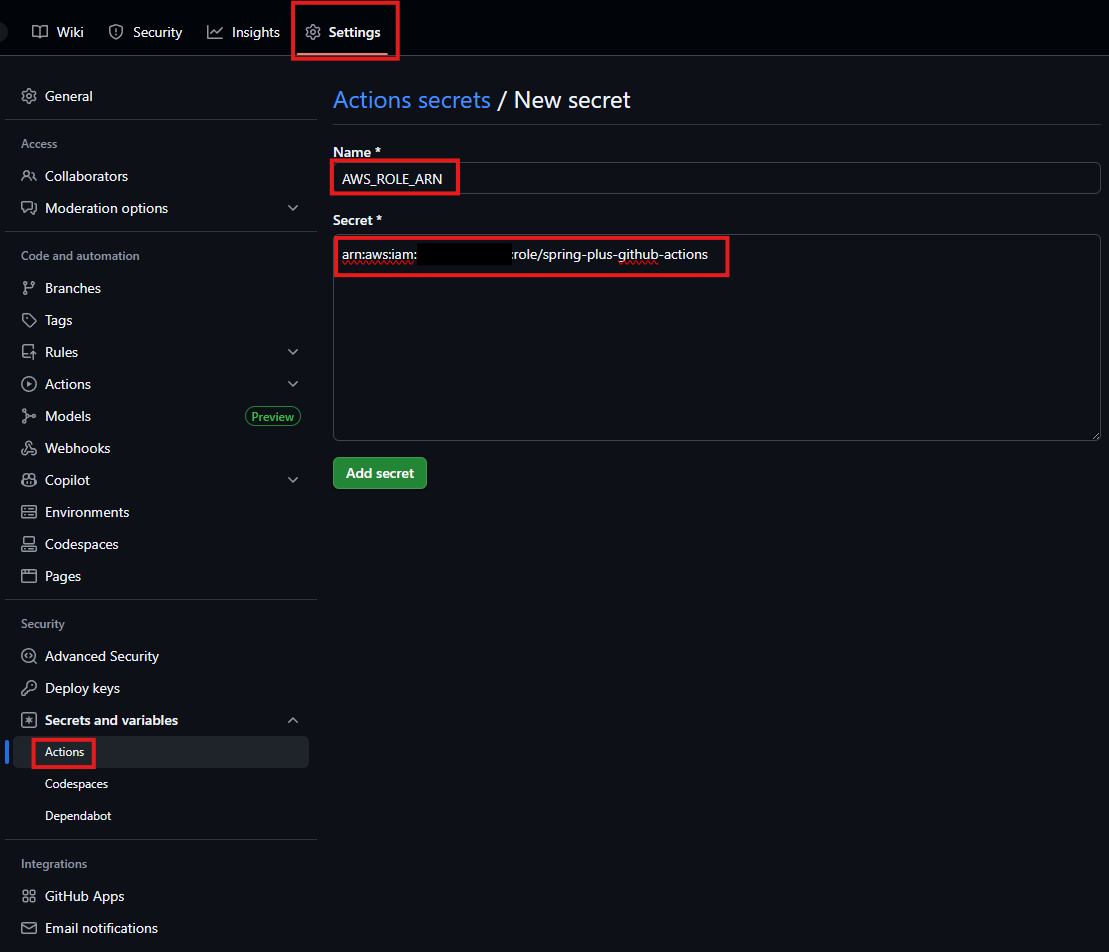
2. GitHub Secrets 설정
먼저 GitHub Secrets에 해당 포스팅에서 만든 OIDC용 Role ARN을 등록합니다.
3. workflows 파일 구조
1
2
3
4
5
.github/
└── workflows/
    ├── ci.yml
    ├── cd.yml
    └── reusable-build.yml
4. 공통 빌드 로직 (Reusable Workflow)
CI와 CD 모두에서 사용하는 빌드 단계를 Reusable Workflow로 분리했습니다.
reusable-build.yml
1
2
3
4
5
6
7
8
9
10
11
12
13
14
15
16
17
18
19
20
21
22
23
24
25
26
27
28
29
30
31
32
33
34
35
# 공통 빌드 로직
name: Reusable Build

on:
  workflow_call:
    inputs:
      run-tests:
        description: 'Whether to run tests'
        required: false
        default: false
        type: boolean

jobs:
  build:
    runs-on: ubuntu-latest
    steps:
      - name: Checkout
        uses: actions/checkout@v4

      - name: Set up JDK
        uses: actions/setup-java@v4
        with:
          distribution: temurin
          java-version: 17

      - name: Grant execute permission for Gradlew
        run: chmod +x ./gradlew

      - name: Build (with tests)
        if: ${{ inputs['run-tests'] == true }}
        run: ./gradlew clean build --no-daemon

      - name: Build (skip tests)
        if: ${{ inputs['run-tests'] != true }}
        run: ./gradlew clean build --no-daemon -x test
run-tests입력값으로 테스트 실행 여부를 제어- CI에서는
true, CD에서는false로 전달
5. CI Workflow (PR & Push 검증)
ci.yml
1
2
3
4
5
6
7
8
9
10
11
12
13
14
15
16
17
18
19
20
21
22
23
24
25
26
27
28
29
30
# PR & Push 검증 (빌드 + 테스트)
name: CI

on:
  push:
    branches:
      - "feat/**"
      - dev
    paths-ignore:
      - "README.md"
      - "**/*.md"
      - "docs/**"
  pull_request:
    branches:
      - dev
      - main
    paths-ignore:
      - "README.md"
      - "**/*.md"
      - "docs/**"

concurrency:
  group: ci-${{ github.ref }}
  cancel-in-progress: true

jobs:
  ci:
    uses: ./.github/workflows/reusable-build.yml
    with:
      run-tests: true
feat/**,dev push→ 빌드 & 테스트dev,main PR→ 빌드 & 테스트paths-ignore로 문서만 수정 시 CI 실행 제외concurrency로 중복 실행 방지
6. CD Workflow (main 브랜치 배포)
cd.yml
1
2
3
4
5
6
7
8
9
10
11
12
13
14
15
16
17
18
19
20
21
22
23
24
25
26
27
28
29
30
31
32
33
34
35
36
37
38
39
40
41
42
43
44
45
46
47
48
49
50
51
52
53
54
55
56
57
58
59
60
61
62
63
64
65
66
67
68
69
70
71
72
73
74
75
76
77
78
79
80
81
82
83
84
85
86
87
88
89
90
91
92
93
94
95
96
97
98
99
100
101
102
103
104
105
106
107
108
109
110
111
112
113
114
115
116
117
118
119
120
121
122
123
124
125
126
# main 브랜치 push -> 빌드 -> 도커 이미지 빌드 & 푸시 & EC2 배포
name: CD

on:
  push:
    branches:
      - main
    paths-ignore:
      - "README.md"
      - "**/*.md"
      - "docs/**"

permissions:
  id-token: write # OIDC
  contents: read

concurrency:
  group: cd-main
  cancel-in-progress: true

env:
  AWS_REGION: ap-northeast-2
  IMAGE_NAME: younghunkimm/spring-plus
  SSM_DOCUMENT: spring-plus-deploy
  SSM_TARGET: 'Key=tag:SSMTarget,Values=spring-plus'
  PARAM_PATH: /github/spring-plus/

jobs:
  build:
    uses: ./.github/workflows/reusable-build.yml
    with:
      run-tests: false

  deploy:
    runs-on: ubuntu-latest
    needs: build
    steps:
      - name: Checkout
        uses: actions/checkout@v4

      - name: Configure AWS credentials (OIDC)
        uses: aws-actions/configure-aws-credentials@v4
        with:
          role-to-assume: ${{ secrets.AWS_ROLE_ARN }}
          aws-region: ${{ env.AWS_REGION }}

      # Parameter Store 에서 DockerHub 자격 증명 가져오기
      - name: Fetch DockerHub creds from SSM Parameter Store
        id: ssm
        shell: bash
        run: |
          set -euo pipefail
          TOKEN="$(aws ssm get-parameter --name ${PARAM_PATH}DOCKERHUB_TOKEN --with-decryption --query Parameter.Value --output text)"
          USER="$(aws ssm get-parameter --name ${PARAM_PATH}DOCKERHUB_USERNAME --with-decryption --query Parameter.Value --output text)"
          echo "::add-mask::$TOKEN"
          echo "$TOKEN" | docker login -u "$USER" --password-stdin
          echo "DOCKERHUB_USERNAME=$USER" >> $GITHUB_ENV

      - name: Build Docker image
        run: |
          GIT_SHA=$(git rev-parse --short HEAD)
          echo "GIT_SHA=$GIT_SHA" >> $GITHUB_ENV
          docker build -t $IMAGE_NAME:latest -t $IMAGE_NAME:$GIT_SHA .

      - name: Push Docker image
        run: |
          docker push $IMAGE_NAME:latest
          docker push $IMAGE_NAME:$GIT_SHA

      - name: Docker logout
        if: always()
        run: docker logout || true

      - name: Trigger SSM deployment (by git SHA)
        run: |
          aws ssm send-command \
            --document-name "$SSM_DOCUMENT" \
            --comment "Deploy $IMAGE_NAME:$GIT_SHA from Github Actions" \
            --parameters "ImageTag=$GIT_SHA" \
            --targets "$SSM_TARGET" \
            --max-concurrency "50%" \
            --max-errors "1" \
            --region "$AWS_REGION" \
            --output json > cmd.json

          COMMAND_ID=$(jq -r '.Command.CommandId' cmd.json)

          # 최대 10분 대기 (120 * 5s)
          for i in {1..120}; do
            total=$(aws ssm list-command-invocations \
              --command-id "$COMMAND_ID" \
              --details \
              --query 'length(CommandInvocations[])' \
              --output text || echo 0)

            succ=$(aws ssm list-command-invocations \
              --command-id "$COMMAND_ID" \
              --details \
              --query 'length(CommandInvocations[?Status==`Success`])' \
              --output text || echo 0)

            fail=$(aws ssm list-command-invocations \
              --command-id "$COMMAND_ID" \
              --details \
              --query 'length(CommandInvocations[?Status==`Failed` || Status==`Cancelled` || Status==`TimedOut`])' \
              --output text || echo 0)

            echo "[$i] total=$total succ=$succ fail=$fail"

            if [ "$fail" -gt 0 ]; then
              echo "At least one invocation failed. Dumping details..."
              aws ssm list-command-invocations --command-id "$COMMAND_ID" --details
              exit 1
            fi

            if [ "$total" -gt 0 ] && [ "$succ" -eq "$total" ]; then
              echo "All invocations succeeded."
              exit 0
            fi

            sleep 5
          done

          echo "Timeout waiting for all instances to succeed."
          aws ssm list-command-invocations --command-id "$COMMAND_ID" --details
          exit 1
- main 브랜치 push → CD 워크플로우 실행
- Reusable Build로 빌드 후 → Docker 이미지 빌드 & 푸시 → SSM Document 실행
7. CI/CD Pipeline 구축 완료
GitHub Actions 실행 결과

EC2 인스턴스에 SSH 접속하여 확인
1
docker ps --filter name=spring-plus
컨테이너의 이미지 태그에 커밋 SHA가 반영된 것을 확인할 수 있습니다.

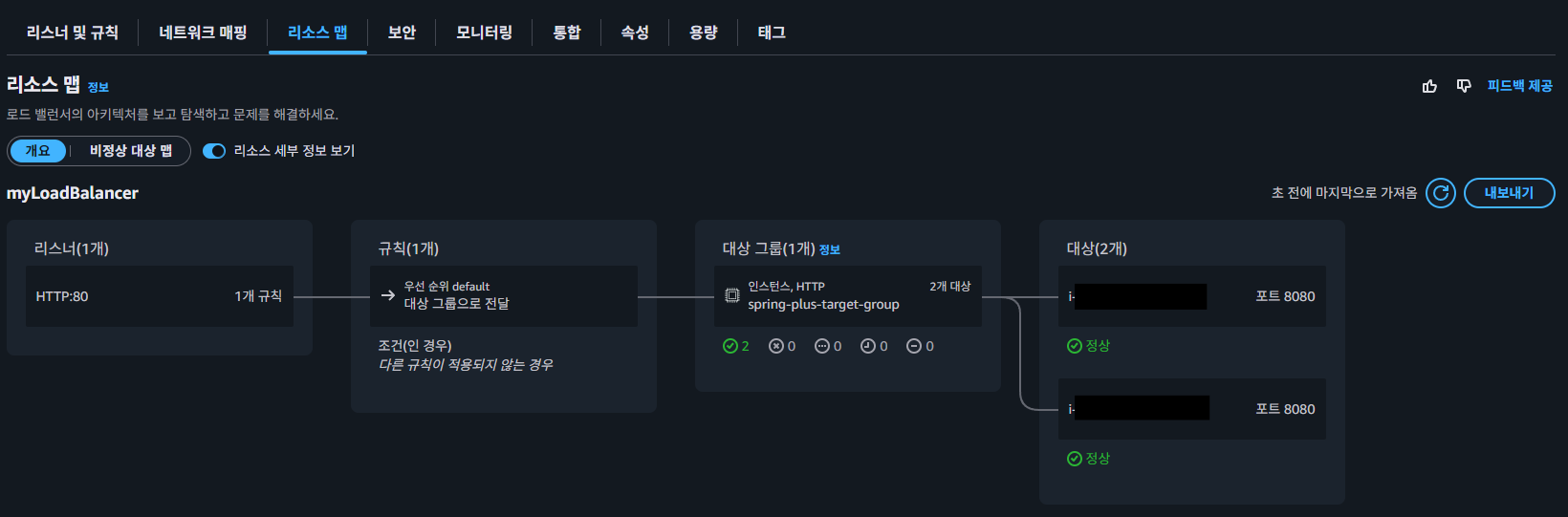
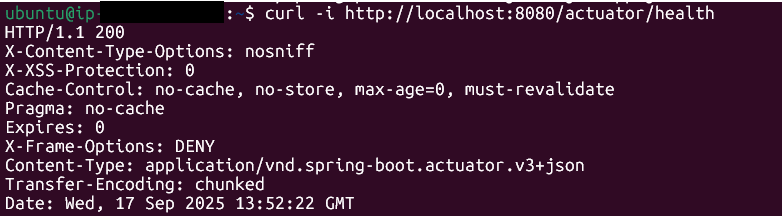
Health Check
회고
배운 점
AWS EC2,ALB,S3,RDS,IAM등을 직접 구성하면서 인프라 흐름을 이해할 수 있었습니다.Security Group,Parameter Store,IAM Role등을 다루며 보안과 편의성의 균형을 고민하게 됐습니다.GitHub Actions의 다양한 기능을 활용하는 방법을 익혔습니다.SSM Document와Run Command를 활용해 배포 스크립트를 중앙 집중 관리하는 방법을 배웠습니다.- CI/CD 파이프라인 구축을 통해 DevOps의 기본 개념과 실무 적용 방법을 이해하게 되었습니다.
GitHub Actions의OIDC기능을 활용하여 AWS 자격 증명을 안전하게 관리하는 방법을 배웠습니다.
어려웠던 점
- IAM 정책/역할 설계 시 최소 권한 원칙을 맞추는 과정이 쉽지 않았습니다.
- CI/CD 파이프라인 설계 시 다양한 요소를 고려해야 해서 머리가 복잡했습니다.
- 권한, 정책, 역할 등을 여러 곳에서 설정해야 하다 보니, 문제가 생겼을 때 어디서 잘못되었는지 파악하기가 어려웠고 이로 인해 많은 시간을 소모했습니다.
개선할 점
- 현재는
SSM Document와Send Command를 활용하여EC2 Instance를 직접 관리하였지만,ECS Fargate와 같은 서버리스 환경을 도입해 관리 부담을 줄이고 확장성을 높이는 방향도 고려해볼 수 있을 것 같습니다. CodeDeploy와 같은 서비스를 연계해 다양한 배포 전략(블루/그린, 카나리, 롤링 업데이트 등)을 도입해서 배포 안정성을 높이고, 동시에 롤백 전략도 체계적으로 마련할 필요가 있을 것 같습니다.